CatalogSearchSpamFilter — Catalog Search Spam Filter
Extension for Magento 2
User Guide
CopeX GmbH
Web: https://copex.io
Email: office@copex.io
Table of Contents
| Section | Page |
|---|---|
| 1 Requirements | 2 |
| 2 Installation | 2 |
| 3 Configuration | 2 |
| 4 How It Works | 4 |
| 5 Troubleshooting | 4 |
1 Requirements
- Magento 2.4.7 – 2.4.9
- PHP 8.3 – 8.5
- Compatible with Luma and Hyvä themes
2 Installation
Via Composer
composer require copex/module-catalog-search-spam-filter
php bin/magento module:enable CopeX_CatalogSearchSpamFilter
php bin/magento setup:upgrade
php bin/magento cache:flush
3 Configuration
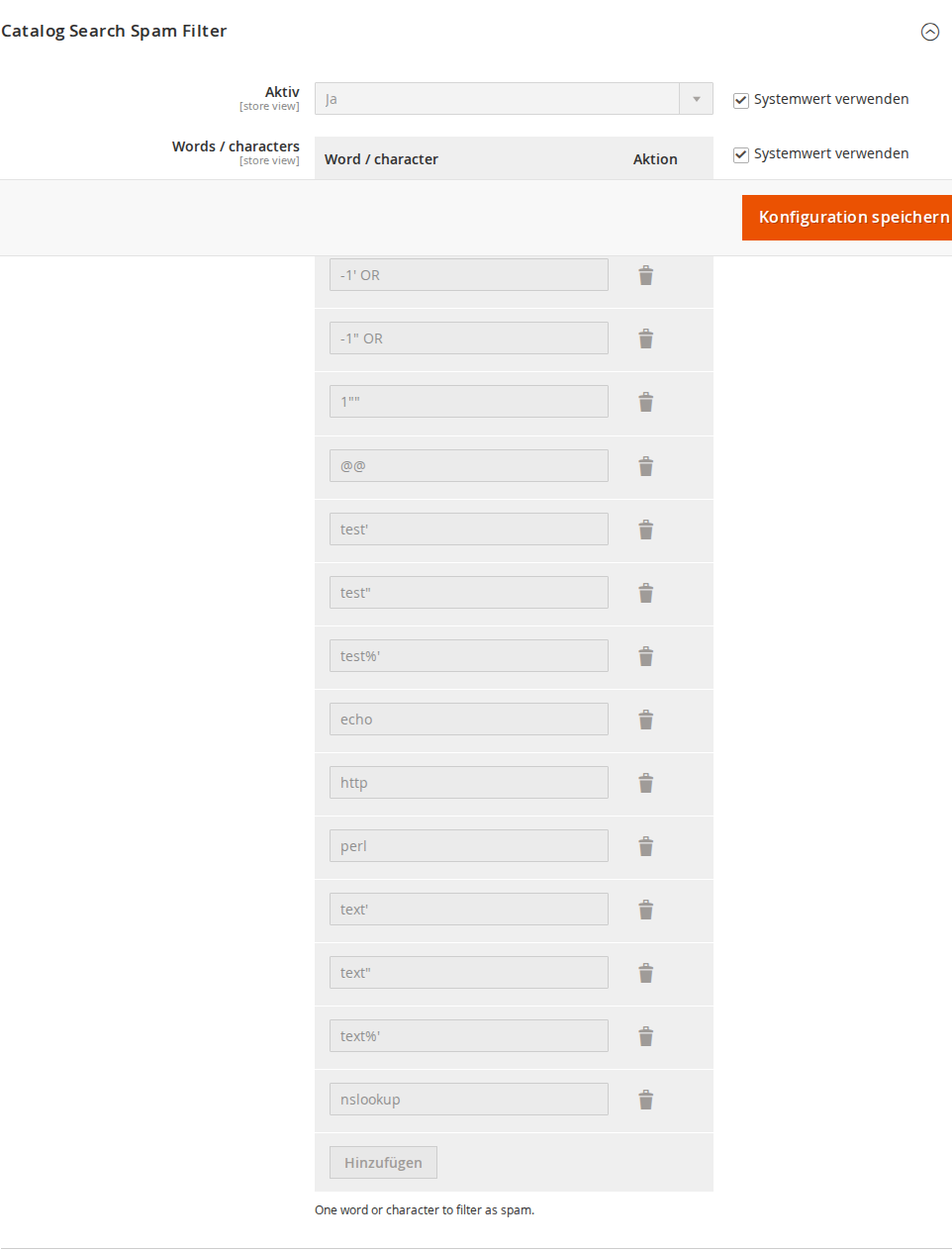
The module configuration is located in the Magento 2 admin panel under Stores > Configuration > Catalog > Catalog > Catalog Search Spam Filter.
3.1 Activation
- Active — Enables or disables the spam filter. When disabled, all search requests are passed through without filtering.
3.2 Blocked Words / Characters
- Words / characters — A configurable list of blocked phrases and characters. If a customer's search query contains any of these entries, they are redirected to the 404 page and the search is not executed.
Each row in the table contains one blocked word or phrase. Use the Add Row button to add new entries. Entries that are no longer needed can be removed with the Delete button.
Default blocklist:
The module ships with a predefined list of common attack vectors:
| Blocked Term | Purpose |
|---|---|
-1 OR |
SQL injection attempt |
-1' OR |
SQL injection attempt |
@@ |
SQL system variable query |
echo |
Code execution attempt |
http |
URL injection |
perl |
Script injection |
nslookup |
DNS lookup injection |
test', test", test%' |
Quote character attacks |
text', text", text%' |
Quote character attacks |
1"" |
Quote character attacks |
This list can be fully customized: entries can be removed or replaced with your own terms.
4 How It Works
4.1 Filter Logic
The spam filter intercepts every storefront search request before Magento fetches search results:
- The observer
ControllerActionPredispatchObserveris triggered on thecontroller_action_predispatchevent. - If the spam filter is disabled, nothing happens.
- If the current action is not
catalogsearch_result_index, nothing happens. - The search query (the
qparameter in the URL) is compared against all configured blocked phrases. - If the query contains a blocked phrase, the request is forwarded to the 404 page.
Important: Filtering happens exclusively on the storefront. Admin searches and API calls are not filtered.
4.2 Redirect Behavior
For a blocked search request, the user is forwarded to Magento's standard 404 page (noroute). No error message is shown and no information is left for the user — the redirect happens transparently.
5 Troubleshooting
-
Legitimate searches are being blocked — Review the blocklist under Stores > Configuration > Catalog > Catalog > Catalog Search Spam Filter > Words / characters. Remove entries that appear too frequently in your customers' normal search queries.
-
Spam searches are not being blocked — Make sure the module is enabled and the cache has been flushed. When new terms are added, a cache flush is required (
php bin/magento cache:flush). -
Configuration changes are not taking effect — After changes to the blocklist, the Magento cache must be flushed for the new settings to become active.
License
Proprietary — CopeX GmbH. One license per production Magento instance.