PostPay — Austrian Post PostPay
Extension for Magento 2
User Manual
CopeX GmbH
Web: https://copex.io
Email: office@copex.io
Table of Contents
| Section | Page |
|---|---|
| 1 Requirements | 2 |
| 2 Configuration | 2 |
| 2.1 PostPay Settings | 2 |
| 3 Features | 3 |
| 3.1 PostPay as a Payment Method at Checkout | 3 |
| 3.2 Payment Instructions for Customers | 4 |
| 3.3 PostPay Refund | 4 |
| 4 Restrictions | 5 |
| 5 Troubleshooting | 5 |
1 Requirements
- Magento 2.4.7 – 2.4.9
- PHP 8.3 – 8.5
- Active PostPay contract with Austrian Post
- API credentials for the PostPay Refund API (API Key + API Secret)
- Optional: CopeX PLC module — handles PostPay refunds automatically when installed (see section 3.3 for the two modes)
2 Configuration
The module configuration is located in the Magento 2 backend under Stores > Configuration > Sales > Payment Methods > Post.at PostPay.
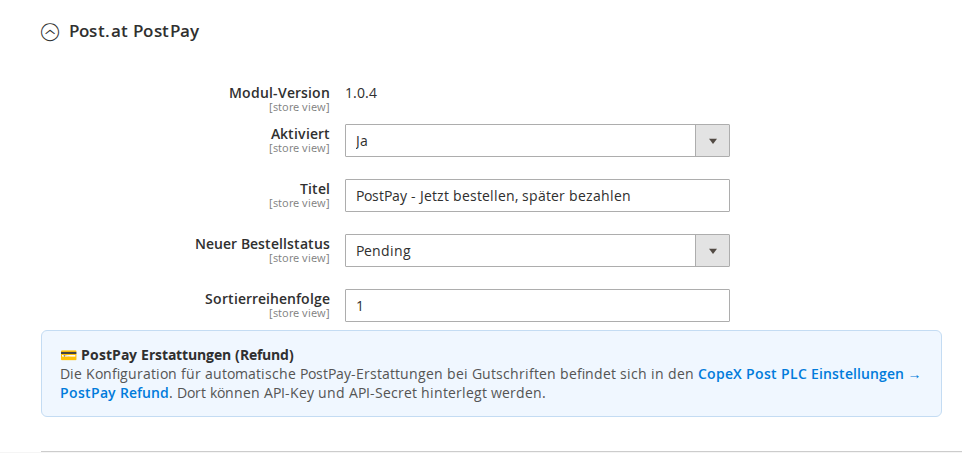
2.1 PostPay Settings
Navigate to Stores > Configuration > Sales > Payment Methods > Post.at PostPay.
- Enabled — Toggles PostPay as a payment method at checkout (Yes / No).
- Title — Name of the payment method shown in the checkout and order overview. Default:
Post Pay. - New Order Status — Order status set after placing an order with PostPay (e.g. Pending).
- Sort Order — Position of the payment method at checkout. Lower numbers appear first.
- PostPay Refund — Information block about the PostPay refund feature. When the CopeX PLC module is installed, refund configuration is located there under Stores > Configuration > Sales > Shipping Methods > PostPay Refund.
2.2 PostPay Refund API (Standalone)
This configuration group is only required when the CopeX PLC module is not installed. With PLC installed, its credentials are used instead.
Settings live under Stores > Configuration > Sales > Payment Methods > Post.at PostPay > PostPay Refund API (Standalone).
- API Key — API key provided by your Post.at PostPay contract. Stored encrypted.
- API Secret — Corresponding secret. Stored encrypted.
- Test Mode —
Yesfor the test environment,Nofor production. Defaults toYes. - Test Endpoint — URL of the PostPay test API. Default:
https://postag.test.apimanagement.ch20.hana.ondemand.com - Production Endpoint — URL of the PostPay production API. Default:
https://postag.prod.apimanagement.ch20.hana.ondemand.com
3 Features
3.1 PostPay as a Payment Method at Checkout
After activation, PostPay appears in the checkout as a selectable payment method. PostPay is an offline payment method — the actual payment processing happens directly between the customer and Austrian Post, not through an online gateway.
PostPay availability:
PostPay is available exclusively under the following conditions:
| Condition | Value |
|---|---|
| Country | Austria (AT) only |
| Currency | Euro (EUR) only |
| Maximum order value | 3,000 EUR |
| Virtual products | Not available (physical products only) |
These restrictions are hard-coded and cannot be changed via configuration.
Process:
- Customer selects PostPay at checkout.
- Order is placed with the configured initial status.
- Merchant creates a shipping label (recommended: CopeX PLC module).
- Package is dispatched as a PostPay shipment.
- Austrian Post collects the amount from the customer after delivery.
- Merchant receives the payment from Austrian Post.
3.2 Payment Instructions for Customers
The module shows customers appropriate payment instructions depending on the order status:
| Order status | Information shown |
|---|---|
| Default | Informational text about PostPay and a note that payment occurs after delivery |
| Canceled | Notice that the order has been canceled |
| Invoice created | Note about payment upon receipt of the shipment |
| Credit memo created | Note about the ongoing refund |
3.3 PostPay Refund
The module supports PostPay refunds in two modes. The active mode is chosen automatically at runtime based on the installed modules.
Mode A — Standalone (without the CopeX PLC module)
When creating a credit memo in the backend, an additional input field "Post-Label / Tracking-Number" appears. This field is mandatory — the refund cannot be sent without it.
Requirements: - PostPay API Key and API Secret entered in the PostPay settings (see section 2.2)
Process: 1. Merchant creates a credit memo in Magento for a PostPay order. 2. Merchant enters the tracking number of the original shipment into the new input field (max. 22 characters). 3. On "Refund Offline" click, an OAuth2 request is sent to the PostPay token API, followed by a REST refund call with the Bearer token. (Note: the button is labelled "Refund Offline" because PostPay is an offline payment method without an online gateway transaction — the API refund is still executed.) 4. On success, an order comment with refund amount and tracking number is added. 5. On failure, the credit memo is rolled back via the Magento transaction and an error message is shown (including the Post.at response log ID).
Limit: PostPay does not accept refunds above EUR 1,200 per request (Post.at policy). Higher amounts must be split into multiple partial refunds.
Mode B — With the CopeX PLC module
When the CopeX PLC module is installed, its plugin takes over the refund automatically. The Post-Label input field from Mode A is not displayed in this case.
Requirements: - CopeX PLC module installed and configured - PostPay API Key and API Secret entered in the PLC settings - A PLC shipping label with tracking number exists for the order (tracking is read automatically)
Process: 1. Merchant creates a credit memo for a PostPay order. 2. The PLC module reads the tracking number from the associated PLC shipping label. 3. The PLC module automatically sends the refund request to the PostPay API. 4. On success, an order comment is added. 5. On failure, the credit memo is not saved.
PostPay Refund configuration (API Key, API Secret) in this mode is done in the CopeX PLC module under Stores > Configuration > Sales > Shipping Methods > PostPay Refund.
4 Restrictions
- PostPay is available only for Austrian delivery addresses.
- Only Euro orders are supported.
- Carts containing only virtual products are not eligible.
- The maximum order value is limited to 3,000 EUR.
5 Troubleshooting
-
PostPay does not appear at checkout — Check that the module is enabled. Make sure the delivery address is in Austria and the order currency is Euro. Virtual products in the cart prevent PostPay from appearing.
-
"Bitte geben Sie ein Post-Label (Tracking-Nummer) für den PostPay-Refund an." — In standalone mode (without PLC), the tracking number must be entered into the "Post-Label / Tracking-Number" field when creating the credit memo.
-
"PostPay refund API credentials are not configured" — Configure API Key and API Secret under Stores > Configuration > Sales > Payment Methods > Post.at PostPay > PostPay Refund API (Standalone) (Mode A) or in the PLC settings (Mode B).
-
"PostPay refund amount exceeds 1200 EUR limit" — PostPay accepts a maximum of EUR 1,200 per refund. For higher amounts, create multiple partial refunds.
-
"PostPay refund failed: ... (LogID: ...)" — The PostPay API rejected the refund. The Log-ID can be forwarded to Post.at support (
andreas.pinterits@post.at) for diagnostics. -
PostPay Refund failed (PLC mode) — Check the PostPay API credentials in the CopeX PLC module under Stores > Configuration > Sales > Shipping Methods > PostPay Refund. Make sure a PLC shipping label with tracking number exists for this order.
-
Admin notification "CopeX PLC not installed" — This notification was originally required because PostPay refunds depended on the PLC module. Since version 1.1.0 the PLC module is optional for refunds. The notification simply indicates that without PLC, each refund requires manual entry of the tracking number.
License
Proprietary — CopeX GmbH. One license per production Magento instance. Test and development environments do not require an additional license.