CartDiscountPercentage — Cart Discount Display
Extension for Magento 2
User Guide
CopeX GmbH
Web: https://copex.io
Email: office@copex.io
Table of Contents
| Section | Page |
|---|---|
| 1 Requirements | 2 |
| 2 Installation | 2 |
| 3 Configuration | 2 |
| 4 How It Works | 4 |
| 5 Troubleshooting | 5 |
1 Requirements
- Magento 2.4 or higher
- PHP 8.1 or higher
- Compatible with Luma, Hyvä, and CopeX Green themes
2 Installation
Via Composer
composer require copex/module-cartdiscountpercentage
php bin/magento module:enable CopeX_CartDiscountPercentage
php bin/magento setup:upgrade
php bin/magento cache:flush
3 Configuration
The module configuration is located in the Magento 2 admin panel under Stores > Configuration > Sales > Sales > Additional Cart Discount Information.

3.1 General Settings
- Enable Module — Enables or disables the entire extension. When disabled, no discount information is shown on the storefront.
3.2 Display Options
All of the following fields support the same display modes:
| Display Mode | Description |
|---|---|
| Disabled | Discount information is not shown at this location |
| Percentage only | Shows the discount as a percentage value (e.g. "−15 %") |
| Absolute amount only | Shows the discount as an absolute amount (e.g. "−€12.00") |
| Both percentage and absolute | Shows both the percentage and the amount |
-
Show Discount in Product Detail Page — Controls discount display on product detail pages. When enabled, the calculated discount relative to the original price is shown below the product price.
-
Show Discount in Product List — Controls discount display in product listings (category pages, search results). The discount is shown next to each product's price.
-
Show Subtotal Discount in Minicart — Controls discount display in the mini cart (cart dropdown). The total savings across all cart items are shown.
-
Show Subtotal Discount in Cart — Controls discount display on the full cart page. The cumulative savings across all discounted items are shown.
4 How It Works
4.1 Discount Calculation
The discount calculation is handled by the helper CopeX\CartDiscountPercentage\Helper\SpecialPrice:
- Percentage discount: Calculated as
(original price - final price) / original price * 100 - Absolute discount: Difference between original price and final price
- Promotion period: A discount is only shown within the configured special-price date range
- Cart totals: For cart items, the total discount is aggregated across all products
4.2 Display Locations
The module shows discount information in the following places:
Product detail page:
The calculated discount is shown below the product price (configurable: next to the price or in the product.media.after area).
Product list: In product listings (categories, search results) the discount is shown per product.
Minicart: In the cart dropdown, the total savings across all discounted items are shown. For Hyvä themes, the display is controlled via Alpine.js events.
Cart page: On the full cart page, the summed savings appear below the subtotals.
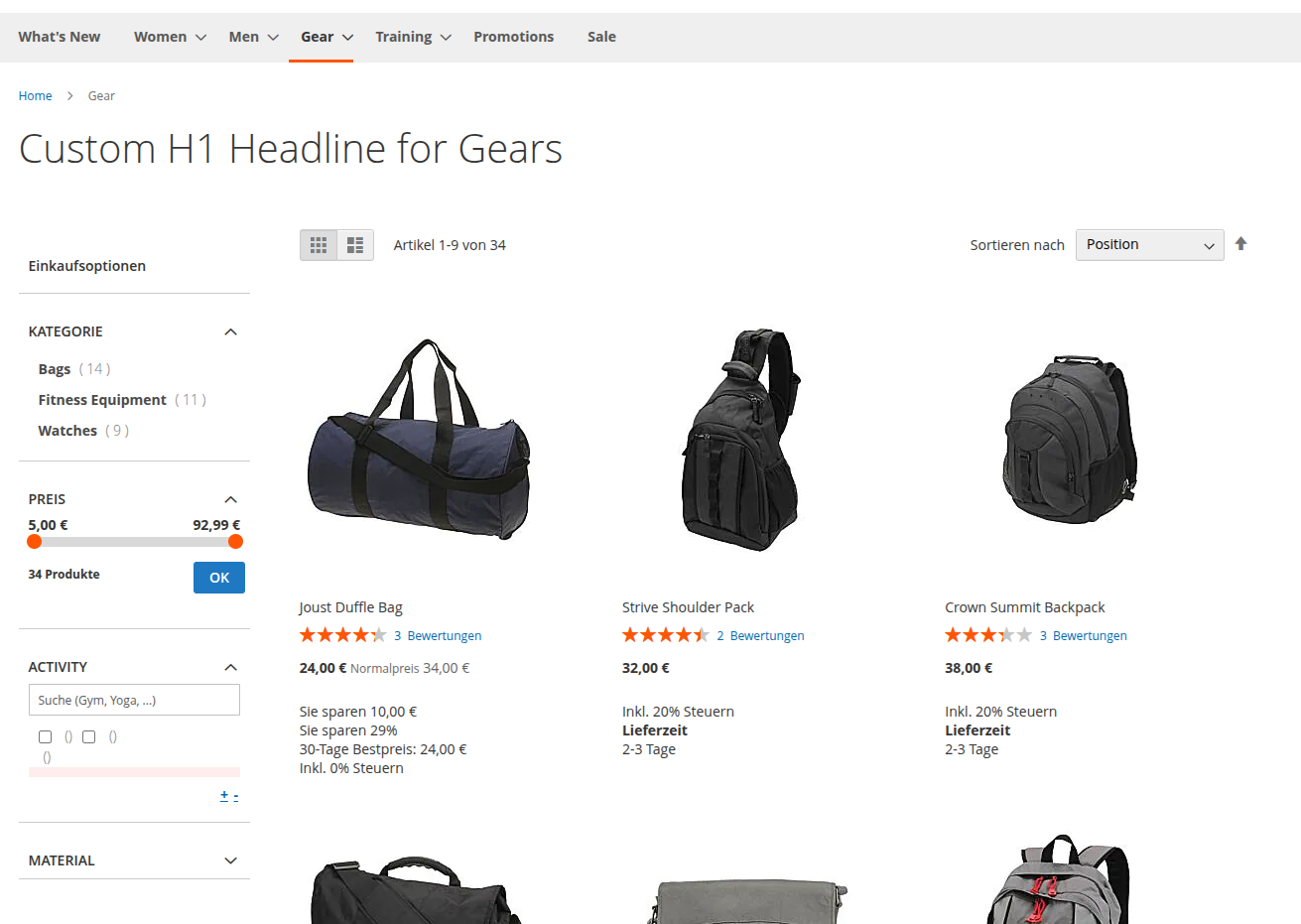
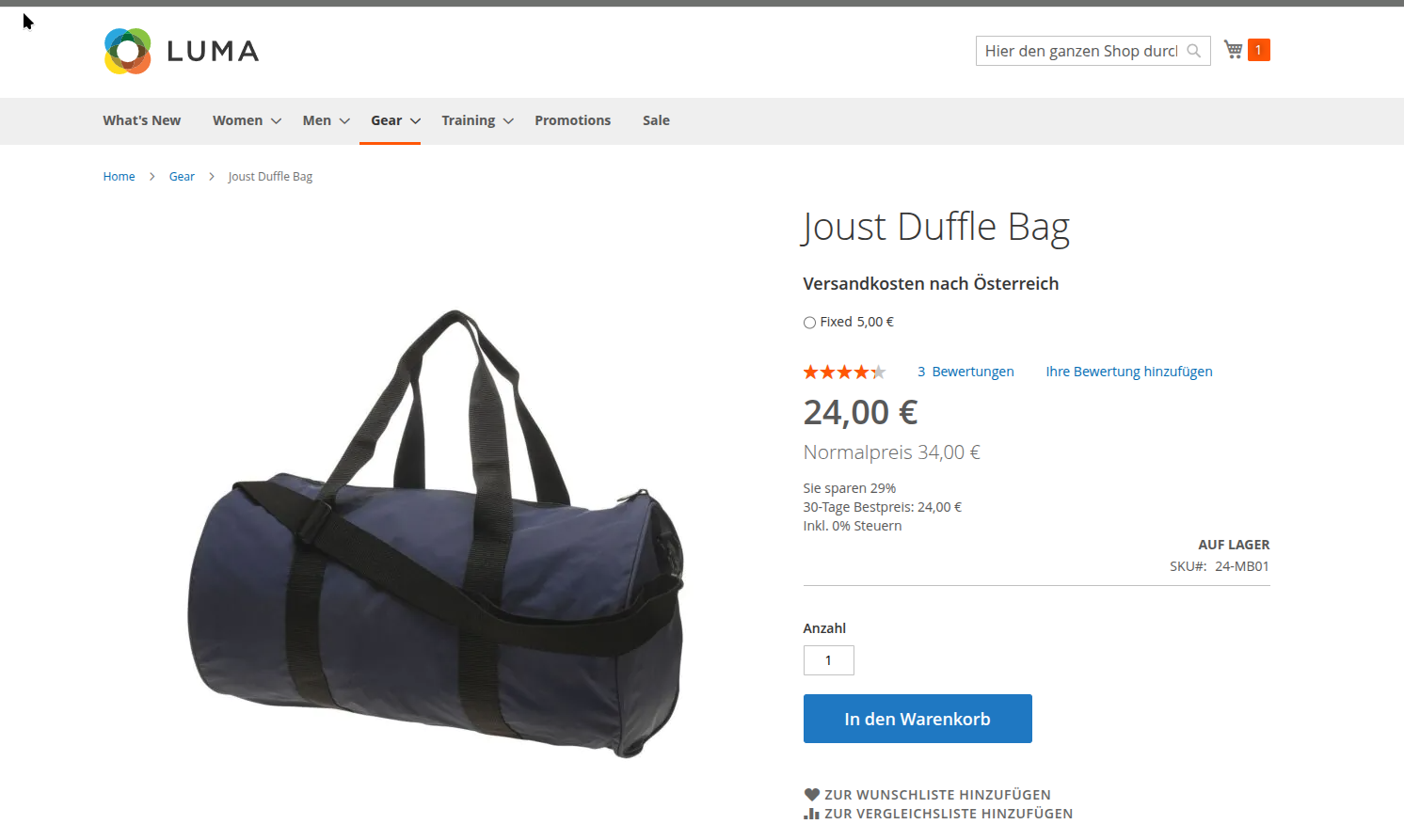
In the frontend view, the discount information is visible directly in the cart context. Customers see the percentage or absolute discount immediately next to the price and totals. If no discounted items are in the cart or the display option is disabled in the configuration, this area remains empty.
4.3 Theme Compatibility
The module supports the following themes:
- Luma and Luma-based themes: Full support for all display locations
- Hyvä Theme: Support with Hyvä-specific templates and Alpine.js integration
- CopeX Green Theme: Full support
4.4 Special Case: Tier Prices
The module handles tier prices correctly. The discount is always calculated relative to the currently applicable original price, not the standard unit price.
5 Troubleshooting
-
Discount is not displayed — Make sure the module is enabled and that the relevant display location is set to something other than "Disabled".
-
Incorrect percentage value — Check that the special price is configured with a valid date range. The module only shows discounts when an active special price exists.
-
Display missing in Hyvä Theme — Make sure the Hyvä config generation has been run correctly (
bin/magento hyva:config:generate). The module registers itself via thehyva_config_generate_beforeobserver. -
Price 0 is not discounted — When the original price is 0, no discount is calculated (division by zero is prevented).
License
Proprietary — CopeX GmbH. One license per production Magento instance.