VAT Validation — Qualified VAT Validation
Extension for Magento 2
User Guide
CopeX GmbH
Web: https://copex.io
Email: office@copex.io
Table of Contents
| Section | Page |
|---|---|
| 1 Installation | 3 |
| 2 Configuration | 4 |
| 2.1 General Settings | 4 |
| 2.2 Qualified Validation | 5 |
| 2.3 Endereco Settings | 6 |
| 2.4 Frontend Settings | 7 |
| 3 Validated VAT Numbers | 8 |
| 4 Admin: VAT Validation in Customer Account | 9 |
| 5 Frontend Validation | 10 |
| 5.1 Qualified Validation in Frontend | 10 |
| 5.2 Unqualified Validation in Frontend | 11 |
| 6 Additional Information | 11 |
| 7 REST API | 12 |
| 7.1 Validate a VAT number | 12 |
| 7.2 Stored validation results (CRUD) | 12 |
1 Installation
Requirements
- Magento 2.4.7 to 2.4.9
- PHP 8.3 to 8.5
Base Module
The base module provides the core functionality. It replaces the standard Magento VAT validation with a qualified validation. The base module ships with Endereco as the default validation provider.
composer require copex/module-vat-validation
bin/magento setup:upgrade
Frontend Module (optional)
The frontend module enables live "on the fly" validation in the frontend (checkout, customer registration, address editing). If this is not desired, it can be omitted. The base module is installed automatically as a dependency.
composer require copex/module-vat-validation-frontend
bin/magento setup:upgrade
Optional Validation Services
| Package | Description |
|---|---|
copex/module-vat-validator-austria |
Validation via the Austrian FinanzOnline service |
copex/module-vat-validator-germany |
Validation via the German BFF-Online service |
2 Configuration
The module configuration is located in the Magento 2 admin under Stores > Configuration > Sales > Vat Validation.
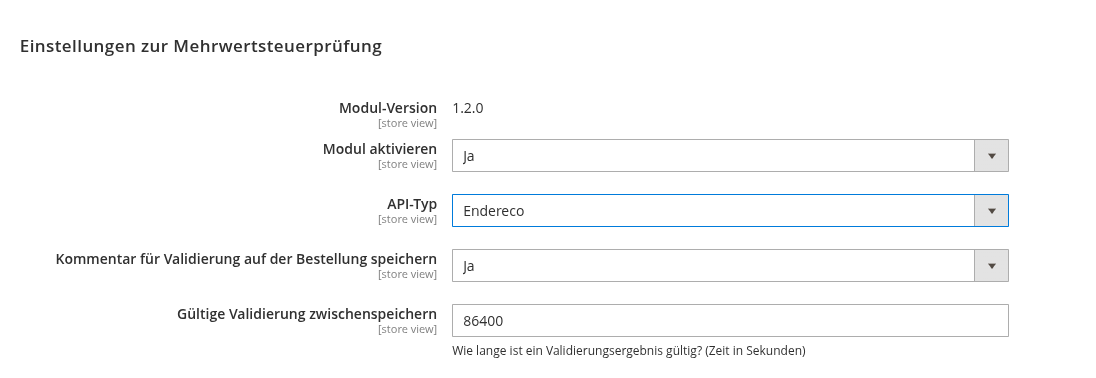
2.1 General Settings
-
Module Version -- Displays the currently installed module version. This helps verify whether the installed version is up to date.
-
Enable Module -- Controls whether the VAT validation module is active. When set to "Yes", VAT number validation is performed.
-
API Type -- Determines which external service is used for VAT validation. Available options depend on the installed modules (Endereco, FinanzOnline, BFF-Online).
-
Save Validation Comment on Order -- When enabled, the validation result is documented directly as a comment on the respective order.
-
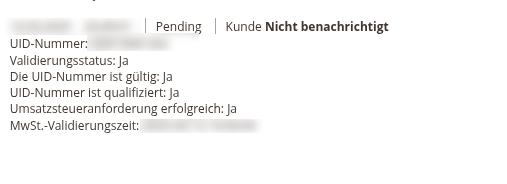
Cache Valid Validation -- Determines in seconds how long a validated result is cached (default: 86400 = 24 hours). As long as a non-expired entry exists in the database, results are served directly from the database and no new requests are made to the validation provider.
-
Format Precheck -- Filters implausible input before a request is sent to the validation service. This saves requests against paid or rate limited services and keeps test input out of the result database. Three levels are available:
-
Off -- Every input is sent to the API.
- Basic (default) -- Rejects obvious nonsense such as free text ("hallo ich bin hubert") or placeholders ("test123"). The check works without a country prefix, because tax numbers outside the EU frequently do not carry one (Canada, Mexico, Israel, Norway, India). Such numbers are passed on unchanged.
- Strict -- Additionally verifies the notation of the 27 EU member states and Northern Ireland as well as the check digit of Swiss VAT numbers. Countries without a registered rule are always passed through.
Note on the "Strict" level: It can reject a valid number when a country changes its format, or when a number from outside the EU happens to start with an EU country code. Use this level only when requests to the validation service need to be saved.
- Additional Countries for VAT Validation -- VAT IDs from these non-EU countries (e.g. Switzerland) are validated and used for the automatic customer group assignment like EU countries. Valid IDs get the "Intra-Union" group unless the merchant country matches. See section 6 for the setup.
2.2 Qualified Validation
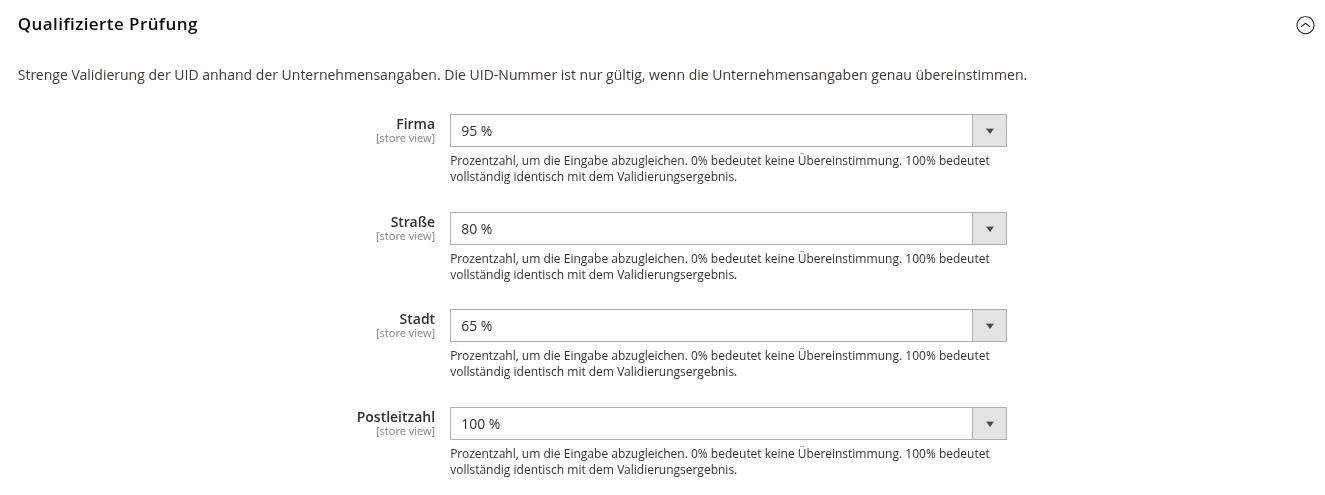
With qualified validation, the VAT number is not only checked for formal correctness but also compared against the company details. For a VAT number to be recognised as valid, the stored information must match the data from the validation source.
The value is specified as a percentage and can be set individually per field:
- Company Name -- Company name match percentage
- Street -- Street match percentage
- City -- City match percentage
- Postcode -- Postcode match percentage
At 0%, no qualified validation is performed for the respective field. At 100%, the entered data must exactly match the data with which the VAT number is registered. A value in between allows for typos or variations in spelling.
The VAT number itself is always checked for validity. Deviations are not permitted.
Note on additional costs: Depending on the API type, using qualified validation may incur additional costs. With the provider Endereco, for example, additional costs apply. If you wish to avoid additional costs, set all options to 0%.
2.3 Endereco Settings
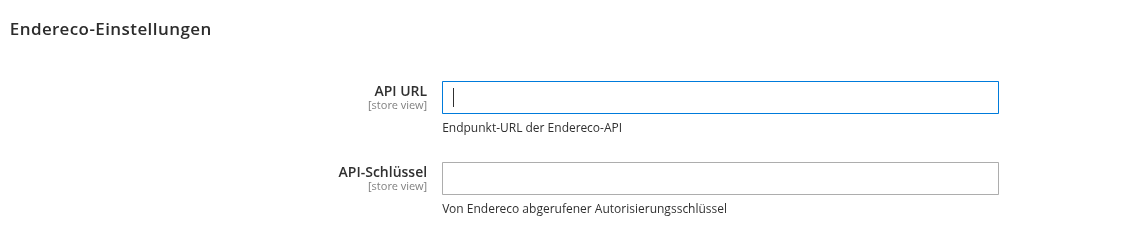
- API URL -- The URL of the Endereco validation service (default:
https://endereco-service.de/rpc/v1) - API Key -- Your personal Endereco API key
If you do not yet have an API key, you can request one directly from Endereco: https://www.endereco.de/apikey-beantragen/
2.4 Frontend Settings
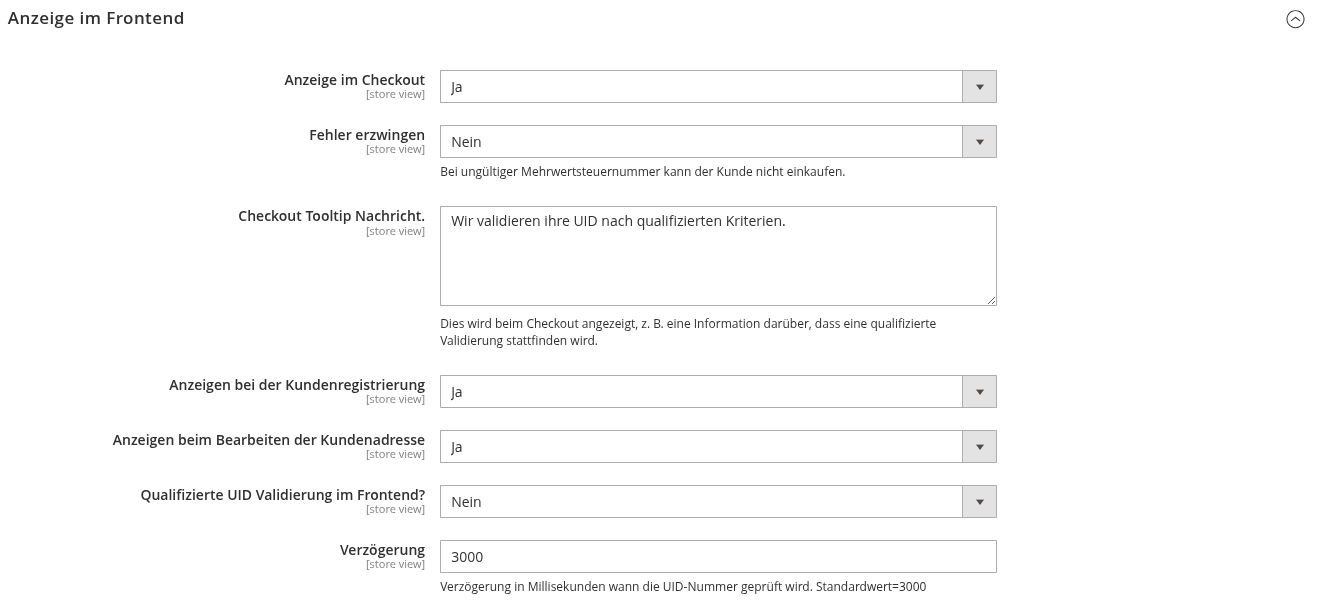
This section is only visible when the frontend module (copex/module-vat-validation-frontend) is installed.
-
Display in Checkout -- Determines whether VAT validation is displayed during the checkout process. When set to "Yes", validation is performed via AJAX after the configured delay and made visible to the customer.
-
Enforce Error -- When set to "Yes", a customer with an invalid VAT number cannot complete a purchase. When set to "No", the purchase is possible even with an invalid VAT number.
-
Checkout Tooltip Message -- A message displayed to customers during checkout as a hint about VAT validation (e.g. "We validate your VAT ID according to qualified criteria.").
-
Display during Customer Registration -- Determines whether VAT validation is displayed via AJAX during customer registration.
-
Display when Editing Customer Address -- Determines whether VAT validation is displayed via AJAX when editing a customer address.
-
Qualified VAT Validation in Frontend -- Controls whether qualified VAT validation is performed directly in the frontend. When set to "No", the stricter validation is only performed in the backend.
-
Delay -- Specifies how long (in milliseconds) to wait after input before performing the VAT validation (default: 3000 ms = 3 seconds).
3 Validated VAT Numbers
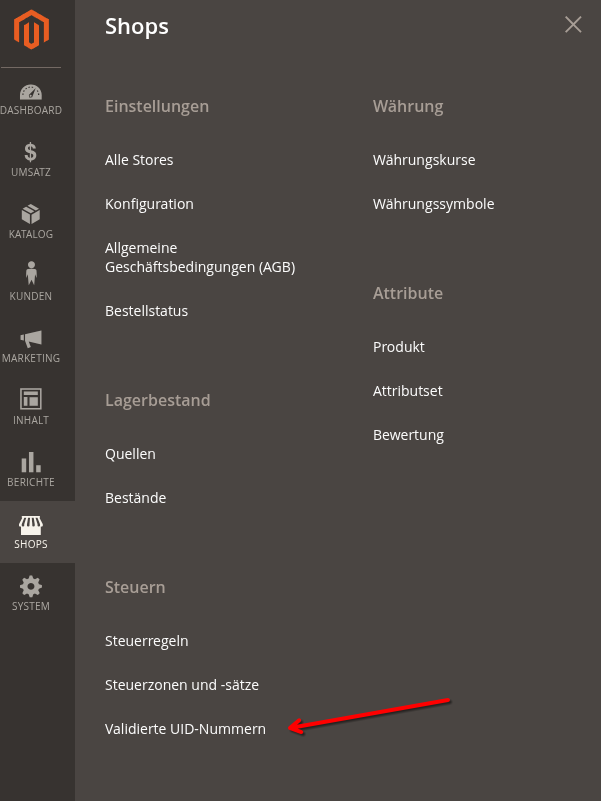
Validated results can be viewed in the admin under Stores > Taxes > Validated VAT Numbers.
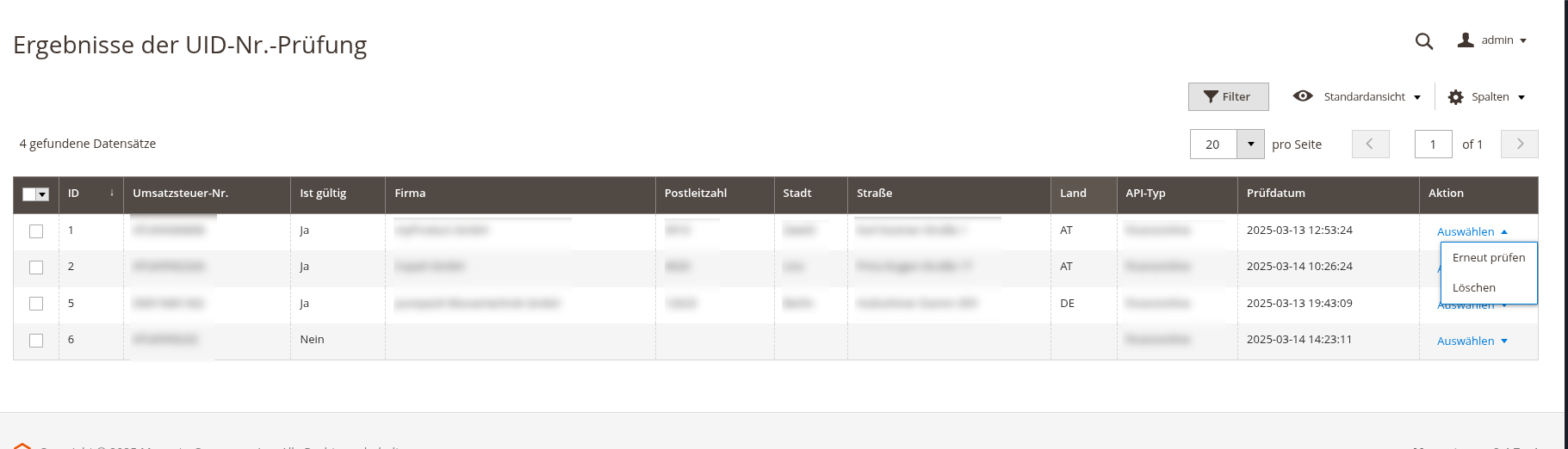
Each entry can be revalidated or deleted from the database at any time via the actions column.
As long as a non-expired entry exists in the database, results are served directly from the database and no new requests are made to the validation provider (FinanzOnline, Endereco, BFF).
4 Admin: VAT Validation in Customer Account
Qualified VAT data can be validated in the admin area for a customer. Edit a customer (in the admin under Customers > All Customers) and click the button in the header: "VAT Number Validation".
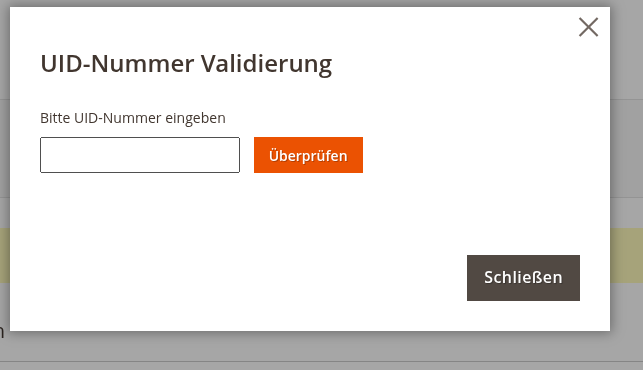
A popup appears with an input field for the VAT number to be validated.
Clicking "Validate" checks the VAT number. For an incorrect VAT number, you receive the result "Validation Status: Invalid". If the VAT number is recognised as valid, you have the option to copy the data (if available) to an existing address and save it automatically to the customer account.
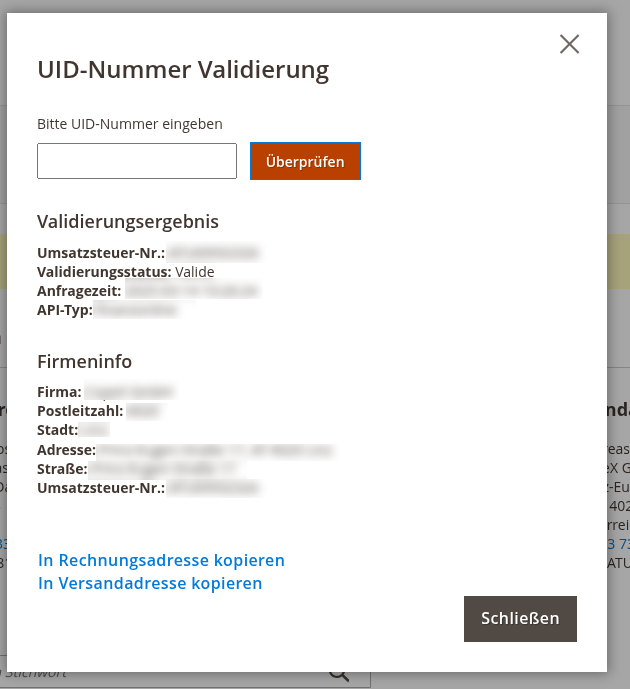
If the customer does not yet have a default billing or shipping address, a new default address is created automatically when copying.
5 Frontend Validation
Frontend validation is only available when the frontend module (copex/module-vat-validation-frontend) is installed. It provides users with direct feedback on their VAT number input in the checkout, during customer registration, and when editing customer addresses.
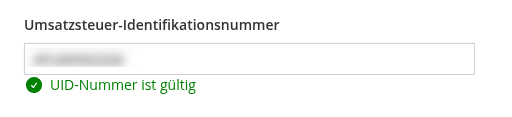
5.1 Qualified Validation in Frontend
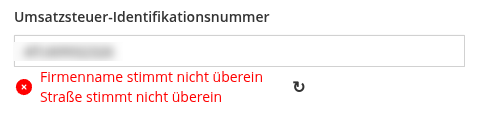
When qualified validation is enabled for the frontend, this is explicitly displayed. An additional icon appears on successful validation. Error messages are also shown indicating which fields do not match.
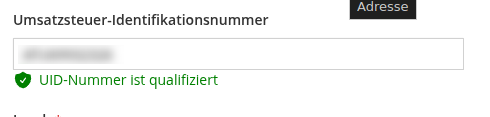
5.2 Unqualified Validation in Frontend
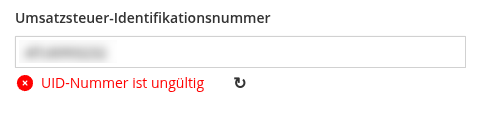
With unqualified validation, only the formal validity of the VAT number is checked, without comparing it against the address data.
Valid VAT with tooltip:

Invalid VAT:
6 Additional Information
Important -- maintain your company details: For the (qualified) VAT validation to work correctly, the company details under Stores > Configuration > General > General > Store Information must be complete and correct -- in particular the business address (country, street, postcode, city) and the VAT Number (your company's VAT ID). This VAT ID is transmitted to the validation service as the requesting party; if it is missing or incorrect, the qualified check cannot be performed.
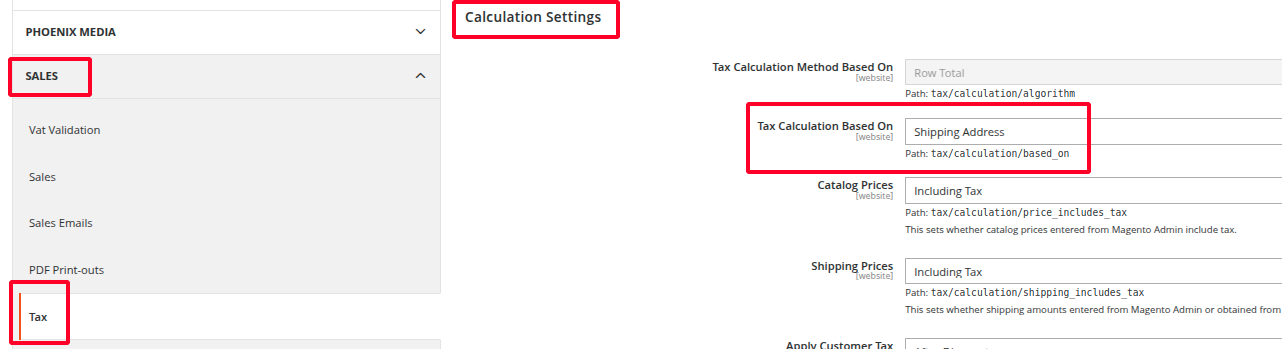
For address validation, the module relies on the standard Magento settings. These can be found under: Stores > Configuration > Sales > Tax.
Note on the order comment: Recording the validation result as an order comment requires the VAT data to be stored on the order address. If the frontend module (copex/module-vat-validation-frontend) is installed, this happens automatically. With a base-module-only installation, Magento's VAT-on-transaction validation must additionally be active: Stores > Configuration > Customer Configuration > Create New Account Options > Enable Automatic Assignment to Customer Group = Yes. Otherwise the result is only logged (see section 3) but not documented on the order.
Tax treatment of EU business customers (reverse charge) is configured through the standard Magento settings. The official guide is available in the Adobe Commerce documentation: Value added tax (VAT) and Taxes.
VAT validation outside the EU (e.g. Switzerland)
By default, Magento only validates VAT IDs for countries in the global Stores > Configuration > General > Countries Options > European Union Countries list. Additional Countries for VAT Validation (section 2.1) lets you add individual non-EU countries such as Switzerland without changing that global list.
Setup:
- Add the country (e.g.
CH) under Additional Countries for VAT Validation at the website scope. - Under Stores > Configuration > Customer Configuration > Create New Account Options, set the Default Group for "Valid VAT ID - Intra-Union" to a tax-exempt customer group (e.g. with a 0% tax class).
- Keep Enable Automatic Assignment to Customer Group set to "Yes".
Invalid VAT IDs or API errors still use their respective default groups (regular VAT).
7 REST API
The base module provides a REST API. All endpoints are secured via admin token (integration) and require the respective ACL permission.
7.1 Validate a VAT number
POST /rest/V1/copex-vat-validation/validate — ACL: CopeX_VatValidator::validate
Without address data a simple check is performed; with address data the qualified check is applied.
Request:
{
  "vatId": "ATU12345678",
  "company": "ACME GmbH",
  "postcode": "1010",
  "city": "Vienna",
  "street": "Ring 1"
}
Response:
{
  "vat_id": "ATU12345678",
  "is_valid": true,
  "vat_id_valid": true,
  "is_qualified": true,
  "request_success": true,
  "message": "VAT ID qualified",
  "request_identifier": "VALIDATIONID-7",
  "request_date": "2026-06-19 09:00:00",
  "company": "ACME GmbH",
  "postcode": "1010",
  "city": "Vienna",
  "street": "Ring 1",
  "country": "AT"
}
7.2 Stored validation results (CRUD)
| Method | Endpoint | ACL |
|---|---|---|
| GET | /rest/V1/copex-vat-validation/results (searchCriteria) |
CopeX_VatValidator::resource |
| GET | /rest/V1/copex-vat-validation/results/:id |
CopeX_VatValidator::resource |
| POST | /rest/V1/copex-vat-validation/results (create/update) |
CopeX_VatValidator::resource |
| DELETE | /rest/V1/copex-vat-validation/results/:id |
CopeX_VatValidator::delete |
License
Proprietary — CopeX GmbH. One license per production Magento instance. Test and development environments do not require an additional license.