LowestPriceHistory — Price History & Lowest Price
Extension for Magento 2
User Manual
CopeX GmbH
Web: https://copex.io
Email: office@copex.io
Table of Contents
| Section | Page |
|---|---|
| 1 Requirements | 2 |
| 2 Configuration | 2 |
| 2.1 General Settings | 2 |
| 2.2 Display Settings | 3 |
| 2.3 Clean Up | 4 |
| 2.4 Cron Update | 4 |
| 3 Features | 5 |
| 3.1 Price History Tracking | 5 |
| 3.2 Lowest Price Display on the Frontend | 5 |
| 3.3 Admin Price History Grid | 6 |
| 4 Console Commands | 6 |
| 5 Troubleshooting | 7 |
1 Requirements
- Magento 2.4.7 – 2.4.9
- PHP 8.3 – 8.5
- Hyvä Theme or Luma Theme
- Recommended for EU Omnibus Directive compliance: mandatory display of the lowest price of the last 30 days for advertised price reductions
2 Configuration
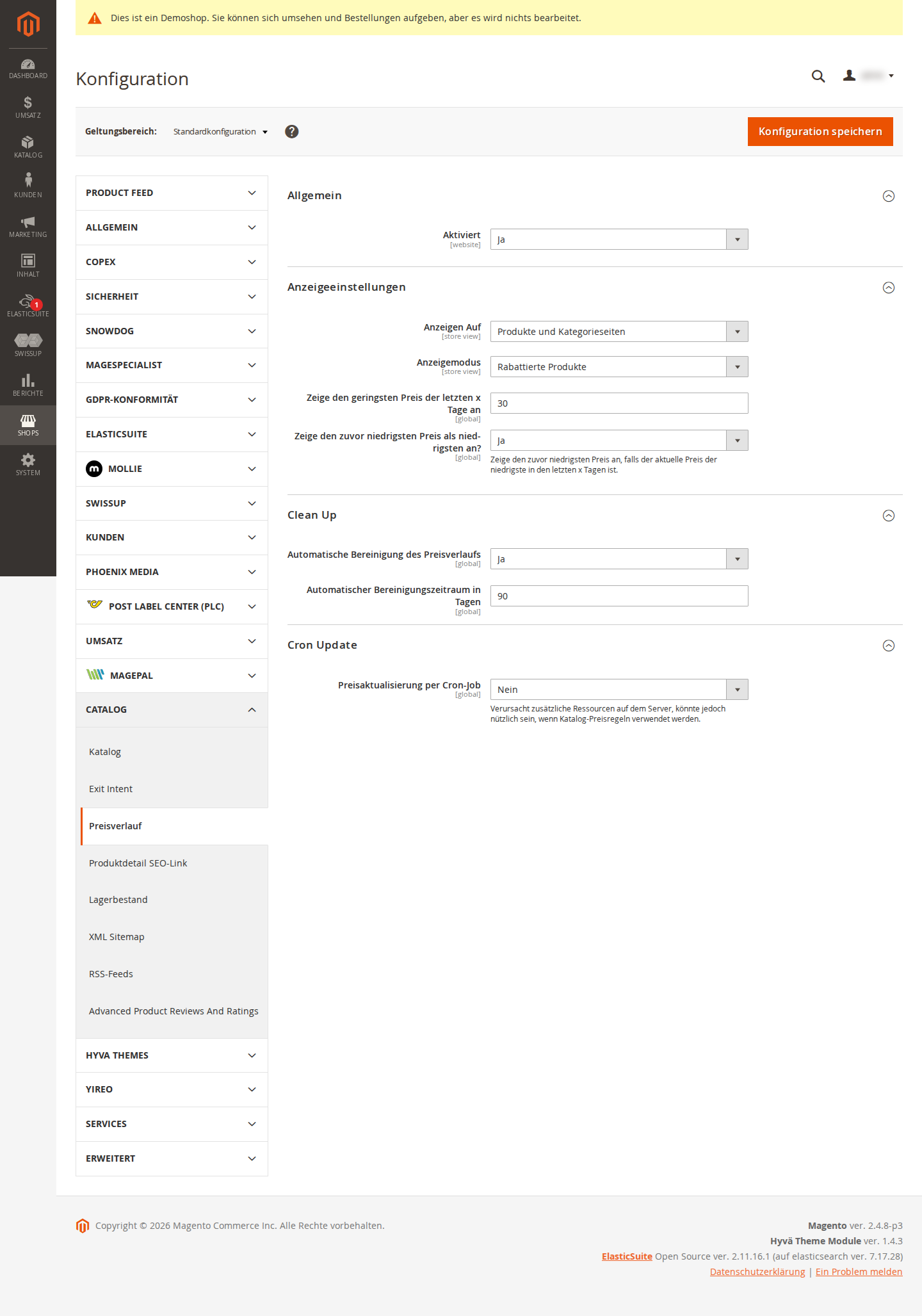
The module configuration is located in the Magento 2 backend under Stores > Configuration > Price History.
2.1 General Settings
Navigate to Stores > Configuration > Price History > General.
- Enabled — Master switch for the entire module (Yes / No). When disabled, no price changes are stored and the frontend display is hidden.
2.2 Display Settings
Navigate to Stores > Configuration > Price History > Display Settings.
This section is only visible when the module is enabled under General.
- Display On — Determines on which pages the lowest price is shown:
- Nowhere — No frontend display
- Product Detail Page — Only on individual product pages
-
Product Detail Page & Category — On product pages and in category listings
-
Display Mode — Controls for which products the lowest price appears:
- Only for discounted products — Display only when the current price is lower than the regular price
-
For all products — Display regardless of the current price
-
Show lowest price of the last x days — Number of days over which the lowest price is calculated. Default:
30. For EU Omnibus compliance, the value30is recommended. -
Show previous lowest price — If the current price is already the lowest price within the last x days, the previous lowest price is shown instead (Yes / No).
2.3 Clean Up
Navigate to Stores > Configuration > Price History > Clean Up.
This section is only visible when the module is enabled under General.
- Price History Auto-Cleanup — Enables automatic cleanup of old price history entries (Yes / No).
- Auto-Cleaning Period in Days — Entries older than this value are automatically deleted. Default:
90days. Only visible when auto-cleanup is enabled.
2.4 Cron Update
Navigate to Stores > Configuration > Price History > Cron Update.
This section is only visible when the module is enabled under General.
- Update Prices per Cron — Enables a daily cron job that refreshes all product prices in the price history (Yes / No). Useful when using catalog price rules, as these price changes do not always trigger a product-save event. Causes additional server resource usage.
3 Features
3.1 Price History Tracking
The module tracks price changes automatically in the following situations:
| Trigger | Description |
|---|---|
| Product save in the backend | Every manual price change on a product is immediately written to the price history. |
| Product save via API | Price changes via REST/GraphQL API are also captured. |
| Magento catalog import | After a CSV import, the new prices are automatically added to the price history. |
| Cron job (optional) | When cron is enabled, all product prices are checked and updated daily. |
The module stores only price changes — if a product's price has not changed, no new entry is created (deduplication logic).
Both special prices and tier prices (group prices) are taken into account. The lowest of all available prices is stored.
3.2 Lowest Price Display on the Frontend
On configured pages, the lowest price for the configured period is shown below the product price. The output is formatted in compliance with the EU Omnibus Directive:
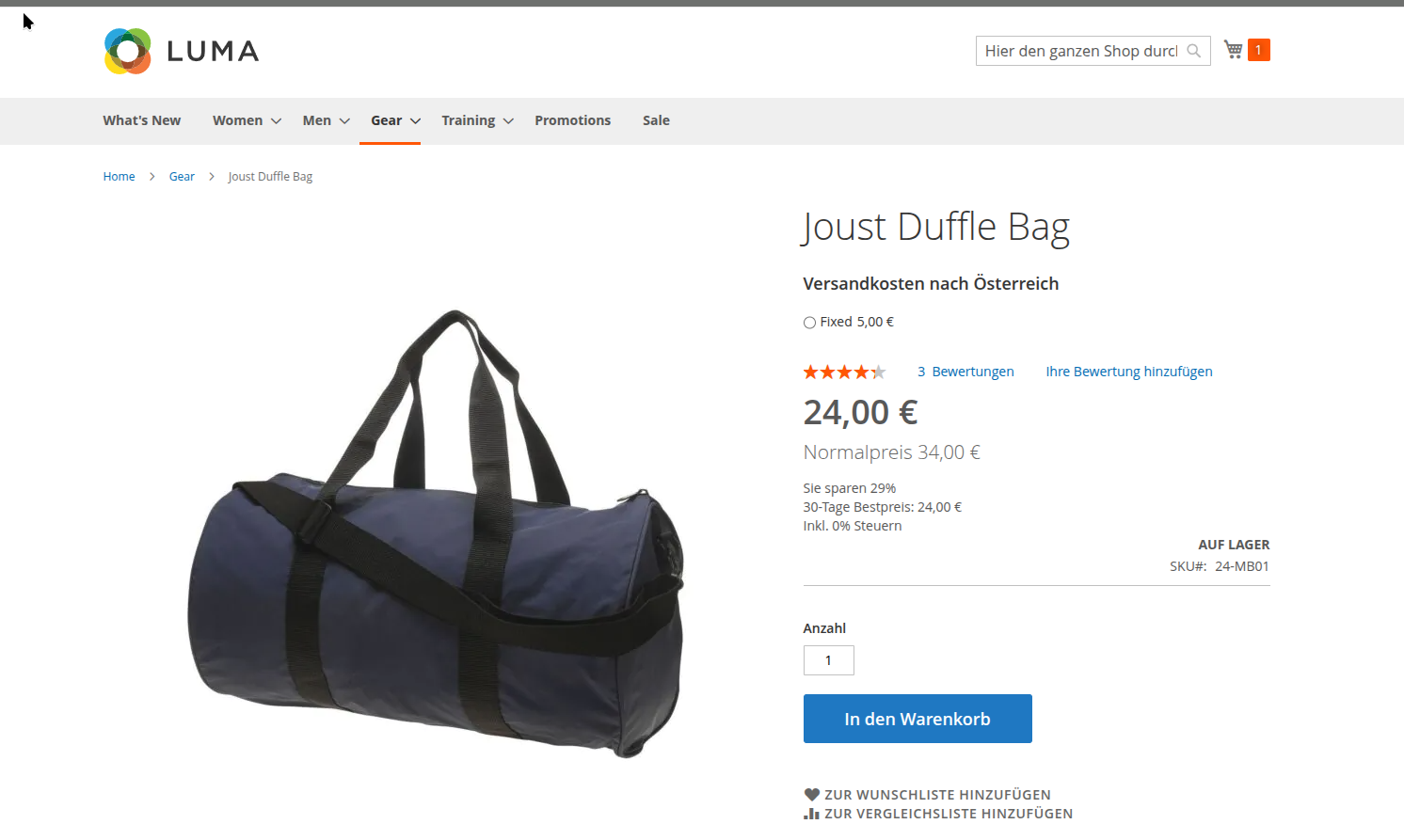
The lowest price information appears directly next to the price display on the product page (and optionally in categories).
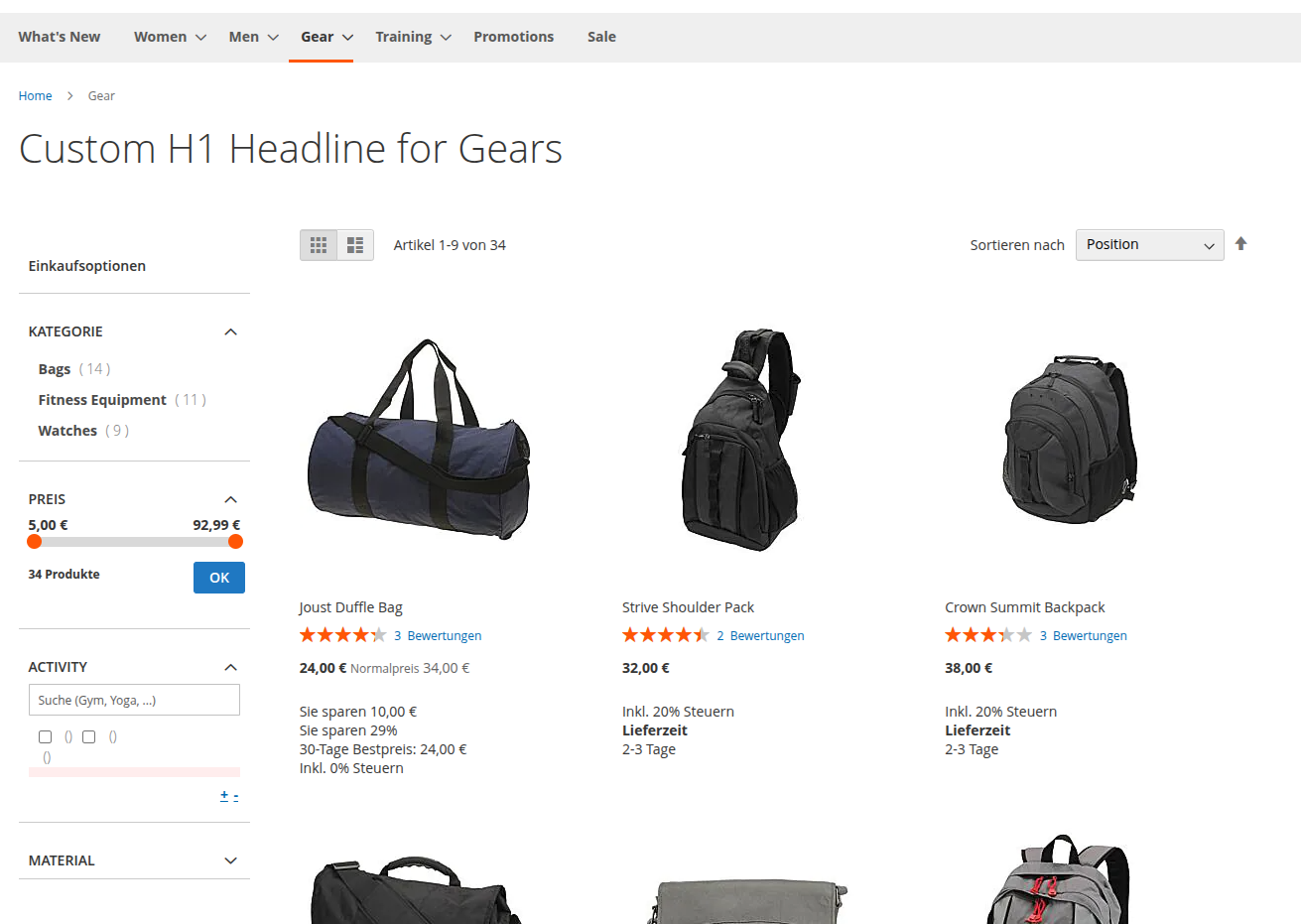
This makes it transparent for customers to see what the lowest price was during the observed period. If a product does not yet have sufficient history, or if the display has been restricted in the backend, no value is shown at this position.
Lowest price in the last 30 days: €XX.XX
The display takes into account: - The configured observation period (e.g. 30 days) - The current customer group (e.g. wholesale customers see group prices) - The current website scope - The selected display mode (discounted only or always)
For grouped products, the lowest prices of all included products are aggregated.
3.3 Admin Price History Grid
Navigate to Catalog > Price History (or directly via the URL copex_lowestpricehistory/lowestpricehistory/index).
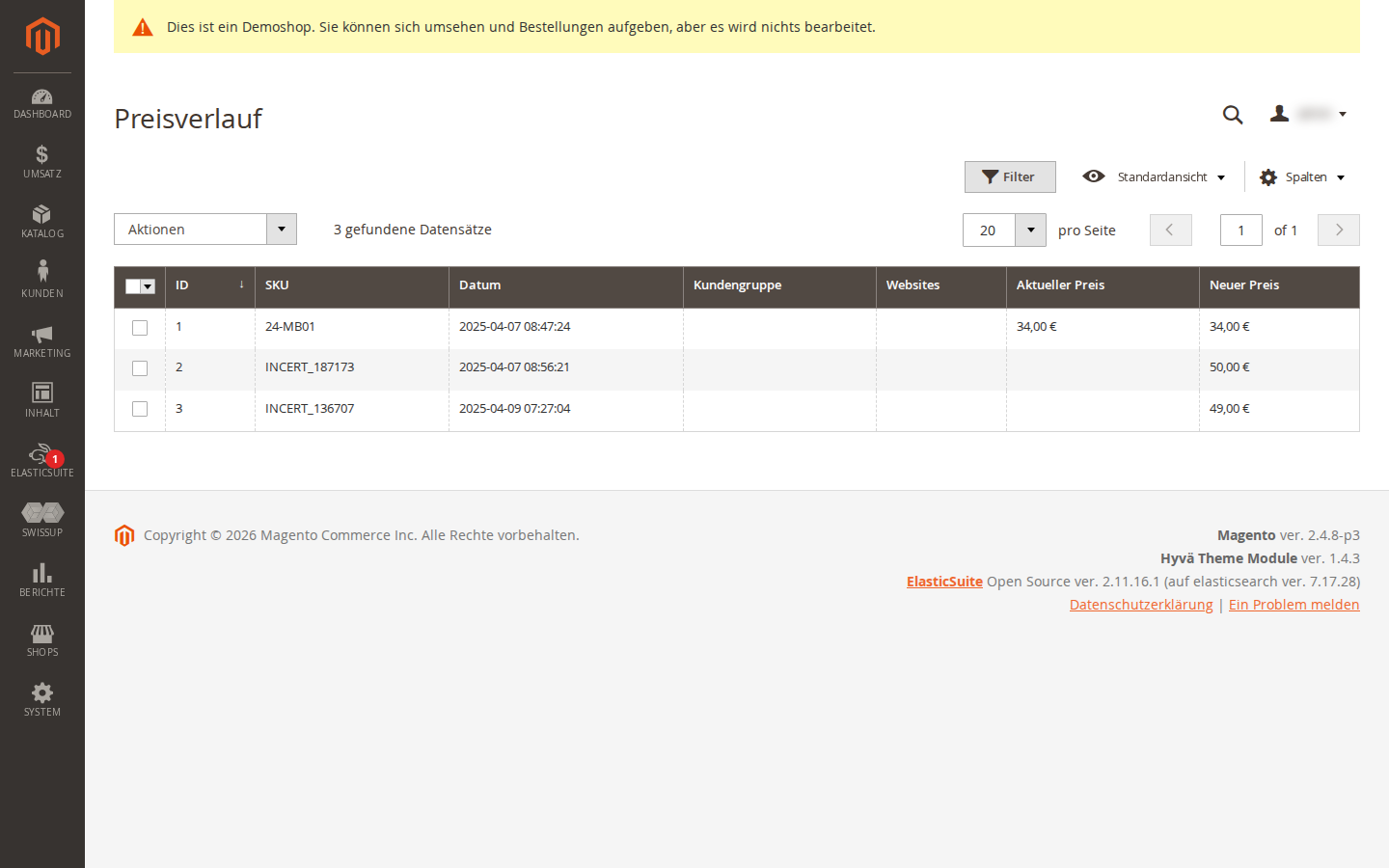
The admin grid shows all stored price history entries with:
- Product SKU
- Price
- Customer group
- Website
- Creation date
Via Mass Actions, selected entries can be deleted to manually clean up the database when needed.
4 Console Commands
The module provides two console commands for manual operations:
# Update all product prices in the price history
# Useful after a third-party import (e.g. techdivision/import)
php bin/magento copex:lowestpricehistory:update

# Manually clean up old price history entries
php bin/magento copex:lowestpricehistory:clean
The update command is particularly useful when external import tools are used that do not trigger the standard Magento product-save event.
5 Troubleshooting
-
Lowest price is not displayed — Check that the module is enabled under Stores > Configuration > Price History > General. Also check the settings under Display Settings (Display On, Display Mode).
-
Price history contains no entries — Make sure that at least one price change has been saved after the module was enabled, or that the console command
copex:lowestpricehistory:updatehas been run. -
Cron job is not running — Make sure the Magento cron is properly configured (
bin/magento cron:run). Check under Stores > Configuration > Price History > Cron Update that the option is enabled.
License
Proprietary — CopeX GmbH. One license per production Magento instance. Test and development environments do not require an additional license.