DiscountCodeUrl — Coupon Code via URL
Extension for Magento 2
User Guide
CopeX GmbH
Web: https://copex.io
Email: office@copex.io
Table of Contents
| Section | Page |
|---|---|
| 1 Requirements | 2 |
| 2 Installation | 2 |
| 3 Configuration | 2 |
| 4 Usage | 4 |
| 5 Troubleshooting | 5 |
1 Requirements
- Magento 2.4.7 – 2.4.9
- PHP 8.3 – 8.5
- Compatible with Luma and Hyvä themes
2 Installation
Via Composer
composer require copex/module-discount-code-url
php bin/magento module:enable CopeX_DiscountCodeUrl
php bin/magento setup:upgrade
php bin/magento cache:flush
3 Configuration
The module configuration is located in the Magento 2 admin panel under Stores > Configuration > Sales > Sales > Discount URL Settings.
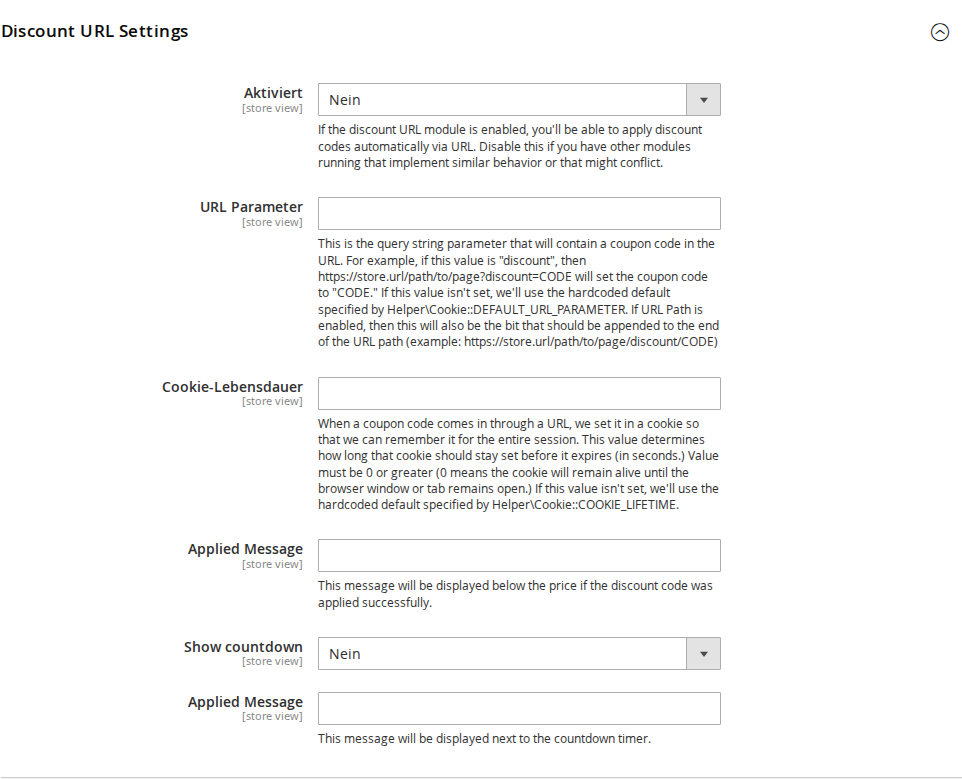
3.1 Activation
- Enabled — Enables or disables the entire module. When disabled, URL parameters for coupon codes are ignored and no automatic coupon code application takes place.
3.2 URL Parameter
- URL Parameter — The name of the query string parameter that contains the coupon code. Default value:
discount.
Examples:
- With discount (default): https://myshop.at/?discount=MYCODE
- With coupon: https://myshop.at/?coupon=MYCODE
- With promo: https://myshop.at/?promo=MYCODE
3.3 Cookie Lifetime
- Cookie Lifetime — Specifies how long the coupon code is stored in the browser cookie (in seconds). Default value:
0(session cookie — stays active until the browser window or tab is closed). A value greater than 0 specifies the number of seconds, e.g.3600for one hour or86400for one day.
3.4 Messages
-
Applied Message — Text displayed below the product price when a coupon code has been successfully applied (e.g. "Coupon code MYCODE has been applied").
-
Show countdown — Enables a countdown timer on the storefront showing how long the coupon code remains valid.
-
Applied Message (countdown timer) — Text displayed next to the countdown timer.
4 Usage
4.1 Passing a Coupon Code via URL
Append the configured URL parameter with the desired coupon code to any store URL:
https://myshop.at/?discount=SUMMER20
https://myshop.at/sale?discount=SUMMER20
https://myshop.at/new-products.html?discount=SUMMER20
When this URL is visited, the following happens:
- The module reads the
discountparameter from the URL. - The coupon code is validated (exists, not expired, still usable).
- If the code is valid, it is saved in a cookie.
- The code is automatically applied to the cart as soon as the customer adds items or proceeds to checkout.
- After a completed purchase, the cookie is automatically deleted.
4.2 Session Persistence
The coupon code is stored in a browser cookie and stays active across multiple pages:
- When items are added to the cart, the code is applied automatically.
- When the cart or checkout is opened, the code is already entered.
- The cookie is only deleted after a successful purchase.
Tip for marketing campaigns: Create individual links for different advertising channels to track the effectiveness of each campaign:
https://myshop.at/?discount=NEWSLETTER20    (for newsletter)
https://myshop.at/?discount=SOCIAL15        (for social media)
https://myshop.at/?discount=PARTNER10       (for partner sites)
4.3 Product Page Integration
On product detail pages, the module optionally shows a discount notice:
- When a valid coupon code is active, the discounted price is shown below the regular price.
- The configured confirmation message is also displayed.
4.4 Coupon Validity Check
Before applying the code, it is checked against the following criteria:
- Coupon code exists in the database
- Cart price rule is active and not expired
- Start date of the rule has been reached
- Usage limit has not been exceeded
If any of these checks fail, the code is silently ignored without an error message.
5 Troubleshooting
-
Coupon code is not applied — Make sure the module is enabled and the URL parameter is correctly configured. Check under Marketing > Promotions > Cart Price Rules that the coupon code exists, is active, and has not expired.
-
Code continues to appear after the first purchase — Check that the observer
SalesOrderPlaceAfteris correctly registered. The cookie should be automatically deleted after every completed purchase. -
Code remains active after expiry — The module checks validity on page load, but the cookie may still be stored. Clear the browser cache or wait for the cookie to expire.
-
Countdown is not displayed — Make sure the Show countdown option is enabled in the configuration. For Hyvä themes, the Hyvä config may need to be regenerated.
License
GPL-3.0 Open Source — CopeX GmbH.