CmsBreadcrumbs — CMS Breadcrumbs
Extension for Magento 2
User Guide
CopeX GmbH
Web: https://copex.io
Email: office@copex.io
Table of Contents
| Section | Page |
|---|---|
| 1 Requirements | 2 |
| 2 Installation | 2 |
| 3 Configuration | 2 |
| 4 How It Works | 3 |
| 5 Troubleshooting | 3 |
1 Requirements
- Magento 2.4.7 to 2.4.9
- PHP 8.3 to 8.5
- Compatible with Luma and Hyvä themes
2 Installation
Via Composer
composer require copex/module-cms-breadcrumbs
php bin/magento module:enable CopeX_CmsBreadcrumbs
php bin/magento setup:upgrade
php bin/magento cache:flush
The module is enabled by default after installation.
3 Configuration
The module configuration is located in the Magento 2 admin panel under Stores > Configuration > General > Web > Default Pages.
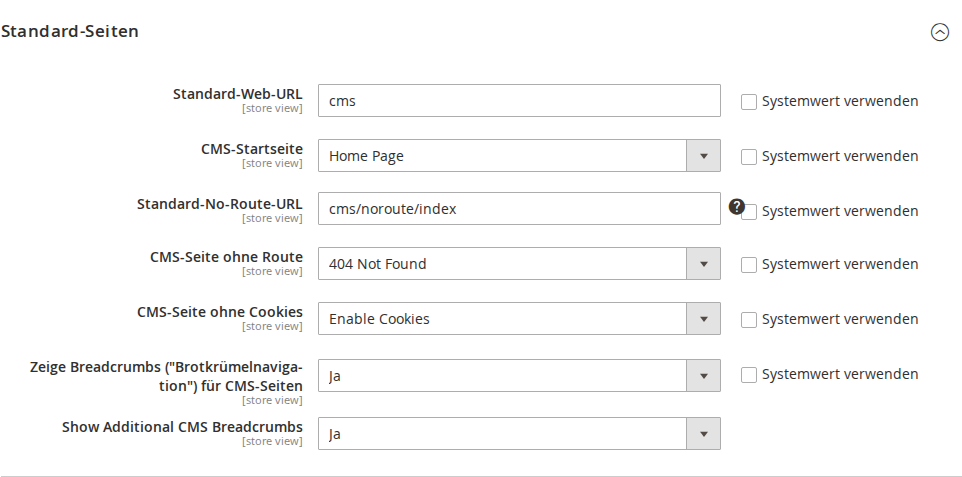
3.1 Enable Breadcrumbs
Navigate to Stores > Configuration > General > Web > Default Pages.
- Show Additional CMS Breadcrumbs — Enables or disables the extended breadcrumb chain for CMS pages. When enabled, intermediate path segments of nested CMS page URLs are shown as clickable breadcrumb links.
4 How It Works
4.1 Breadcrumb Chain
When a visitor opens a CMS page with a multi-level URL path (e.g. /services/shipping/express), the module automatically builds a complete breadcrumb chain:
Example:
URL: https://myshop.at/services/shipping/express
Breadcrumb display:
Home > Services > Shipping > Express
The following rules apply:
- The module analyzes the URL path of the current page and breaks it into individual segments.
- For each intermediate segment, the Magento database is searched for a CMS page with that URL key.
- If a matching CMS page is found, its page title is inserted as a linked breadcrumb item.
- The last item (current page) is added as an unlinked breadcrumb by Magento itself.
4.2 Limitations
- The module only works on CMS pages (not on category pages or product pages).
- The home page (
home) and 404 page (no-route) do not get additional breadcrumbs. - If no matching CMS page exists for an intermediate segment, that segment is rendered without a link or skipped.
5 Troubleshooting
-
Breadcrumbs are not displayed — Make sure the Show Additional CMS Breadcrumbs option is set to "Yes" under Stores > Configuration > General > Web > Default Pages. Then flush the cache.
-
Incorrect breadcrumb titles — The breadcrumb text comes from the page title of the corresponding CMS page. Check under Content > Pages that the CMS pages have the correct titles.
-
Links in breadcrumbs lead to the wrong page — The links are based on the URL key of the CMS page. Make sure the URL keys of intermediate pages are correctly configured and match the URL segments of their child pages.
-
Breadcrumbs broken only on certain pages — Check that CMS pages exist for all intermediate path segments. The module tries to find CMS pages by URL key; if a page is missing for a segment, the chain breaks.
License
Proprietary — CopeX GmbH. One license per production Magento instance.